![Growficient_donkergroen copy.png]](https://help.growficient.com/hs-fs/hubfs/Growficient_donkergroen%20copy.png?height=40&name=Growficient_donkergroen%20copy.png)
Sometimes it is very useful to share access to the Growboard with your colleagues and consultants. This way they can independently view (and edit) the Growboard. The Growboard has different roles for different levels of access.
Types of access to the location
Guest: View-only access to the Growboard and graph
Grower: Access to all features, but only has permission to rename Compartments, Sections, and Placements, cannot add, (re)move, and delete anything
Admin: Access to all features, can rename, add, (re)move, and delete freely
You can read more about the types of access to the location and the company from this help page.
When should I grant someone Grower or Admin access?
If a colleague within your organization needs access to your Growboard, you can add them to your location and assign the role that best matches their responsibilities.
For example:
- Grower: Colleagues who monitor irrigation, review sensor data, and uses Growboard as part of their daily cultivation work
- Admin: Colleagues who also need to manage users, locations, permissions, or other Growboard settings, such as a head grower or location manager
If the person only needs to view your Growboard data without making changes, such as a consult, assign them a Guest role instead.
How to add a colleague to your Growboard
Before you start
Granting access to others is only possible for admins. If you cannot find the appropriate settings on your Growboard, it is likely that you are not an admin. In this case, please contact your location admin or support@growficient.com to change this.
Note! The person must have an existing Growboard account. You can request an account to be made by submitting the person's first name, last name, and email address to support@growficient.com
Step 1: Open the Overview page and look for your location name
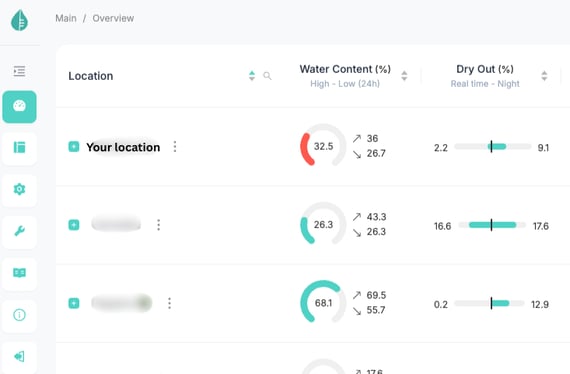
Step 2: Open the location settings
Click on the three dots ⋮ then Admin options → Edit location
.png?width=563&height=482&name=Untitled%20design%20(1).png)
.png?width=563&height=477&name=Untitled%20design%20(2).png)
Step 3: Go to the Users tab
.png?width=563&height=650&name=Untitled%20design%20(3).png)
Click on the + Create -button
.png?width=565&height=265&name=Untitled%20design%20(4).png)
Step 4: Add a new user
Type in the user's email address to search for the user's Growboard account
.png?width=563&height=283&name=Untitled%20design%20(5).png)
Step 5: Assign the role
Select the level of access you want to give by assigning the correct role
Step 6: Save your changes
Click on 'OK' from the bottom right corner
Frequently asked questions
What is the difference between the Grower and Administrator roles?
Administrators can manage users and location settings, while Growers can use the Growboard without access to administrative functions.
Can I change a user's role later?
Yes. You can update a user's role at any time from the Users tab.
I can't find the user I want to add, why?
The user must first have a Growboard account before they can be added to your location. You can request an account to be created by sending the first and last name, and email address of the person who needs an account to support@growficient.com.
Where can I learn more about the different user roles?
See What are the different user roles in Growboard? for a complete overview of permissions.