![Growficient_donkergroen copy.png]](https://help.growficient.com/hs-fs/hubfs/Growficient_donkergroen%20copy.png?height=40&name=Growficient_donkergroen%20copy.png)
When should I use Guest access?
You may want someone outside your organization to review your Growboard data without allowing them to edit your settings or data. For example:
- An advisor or consultant who supports your cultivation decisions
- A fellow grower you would like to compare data with
In these situations, you can assign the Guest role. Guests can view your Growboard data but cannot modify your location settings, sensor configuration, or other Growboard information.
Before you start
Before adding a Guest:
- The person must have a Growboard account.
- If they don't, follow: How to setup "Users"? to create a new account first
- You must have administrator rights for the Growboard location.
How to add a Guest user
Step 1. Open the Overview page
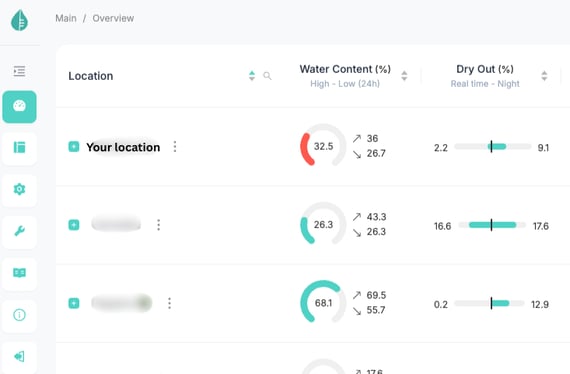
Step 2. Open the location settings
⋮ (three dots) → Admin options → Edit Location
.png?width=563&height=482&name=Untitled%20design%20(1).png)
.png?width=563&height=477&name=Untitled%20design%20(2).png)
Step 3. Go to the Users tab
.png?width=563&height=650&name=Untitled%20design%20(3).png)
.png?width=565&height=265&name=Untitled%20design%20(4).png)
Step 4. Add a new user
Type in the user's email address to search for the user's Growboard account.
.png?width=563&height=283&name=Untitled%20design%20(5).png)
Step 5. Assign the Guest role
From the available roles, select Guest.
The Guest role allows the user to view your Growboard data while preventing them from making changes.
Step 6. Save your changes by clicking 'OK'
The user can now access the location with Guest permissions.
Frequently asked questions
What can a Guest do?
Guests can view Growboard data and dashboards but they cannot edit settings, manage locations, or make any other changes to your growboard.
Can I change a Guest to another role later?
Yes. As the Admin of your location, you can edit the user's role at any time from the Users tab.
I can't find the user.
The user must already have a Growboard account before you can assign them the Guest role.
Where can I learn more about the different user roles?
For an overview of all available user roles and their permissions, see: What are the different user Roles?