![Growficient_donkergroen copy.png]](https://help.growficient.com/hs-fs/hubfs/Growficient_donkergroen%20copy.png?height=40&name=Growficient_donkergroen%20copy.png)
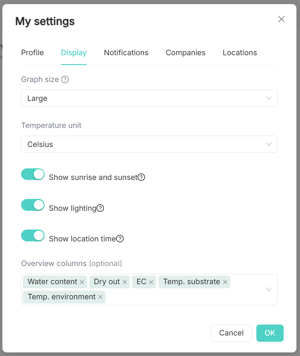
The graph displays sunrise and sunset to help see when a plant is and isn't receiving light. This is visualized as the grey and white areas in the graph background, and shown at the bottom of the graph.
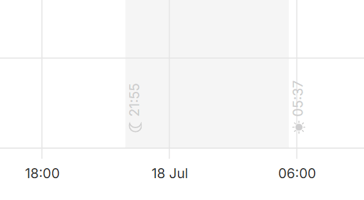
However, these may not be accurate indicators at indoor facilities using artificial light. This can be adjusted to reflect the lighting schedule using the Indoor lighting -setting.
Note! You must be an admin to make the following changes. If you do not have admin rights, please contact your location admin or support@growficient.com to change this.
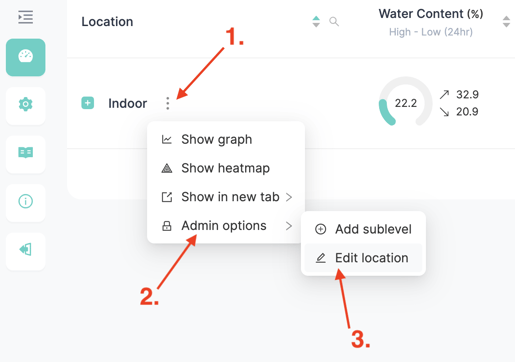
Step 1: Open the location settings
- Click on the three dots ⋮ next to the location name
- Go to 'Admin options'
- Click on 'Edit location'
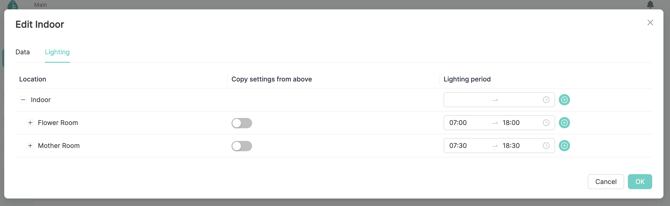
- Click on the tab 'Lighting'
Step 2: Enter the lighting settings
- You can set your lighting times per location, compartment (greenhouse/room level), section (valve/zone level), and placement (plant/sensor level)
- By clicking the
 button, you can add multiple lighting times per location
 - With the 'Copy settings from above' toggle, you can quickly copy the location schedule
- Click 'OK' to save changes
Visibility of lighting on the graph
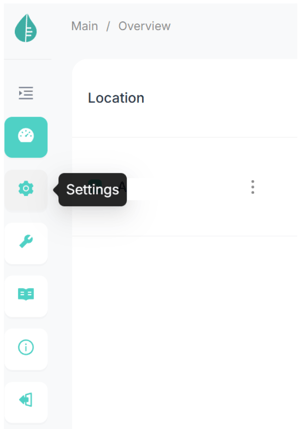
To turn the the lighting schedule on/off in graphs, navigate to User settings from the menu bar on the left