![Growficient_donkergroen copy.png]](https://help.growficient.com/hs-fs/hubfs/Growficient_donkergroen%20copy.png?height=40&name=Growficient_donkergroen%20copy.png)
We try to help you improve your irrigation strategy by giving you as much insight into your substrate. These insights can be used to track plant activity in relation to your strategy and the climate. However, we have upped the ante and developed a tool to peek into the future!
Our Irrigation advisor will predict the expected water uptake based on your old irrigation data and (if wanted) weather information. You can setup your irrigation strategy and see how the water uptake will behave for the next 32-hours based on this strategy. This means that instead of adjusting your irrigation strategy afterwards, you can make adjustments ahead of time, giving you more control in finetuning your irrigation.
You can finetune your irrigation strategy on the fly and easily see the results in your graphs. When you are happy with the results on the graph, you can use the radiation and/or other setpoints to update your strategy in the climate computer.
Please keep in mind: The Irrigation advisor provides general advice only. The predictions are not customised to your specific crop or location. Growficient is not responsible for any outcome resulting from these recommendations.
How can I setup the irrigation advisor?
- We have different prediction models available depending on the type of cultivation
- In order to use the Irrigation advisor, you first need to setup the weather dependency to determine you prediction model
- You can do this by opening your Location settings by clicking on the 3 dots ⋮ and choosing for Admin options → Edit location
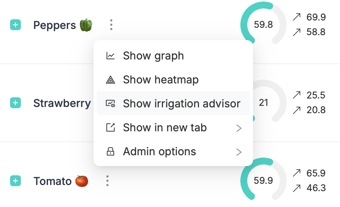
- On the 'Data' tab you will see an option called 'Weather dependency'
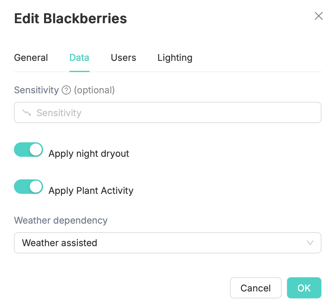
- Here you will have the following options:
- Weather independent: This model operates predicts without any influence on outside light on the crops. Can be used in indoor cultivations.
- Weather assisted: This model predicts based both on historical data and outside light predictions. Use when growing in a Greenhouse environment.
- Weather dependent: Currently not available yet — will be used on outdoor crops.
How can I use the irrigation advisor?
- You can open the Irrigation advisor by clicking on the 3 dots and choose for 'Show irrigation advisor'
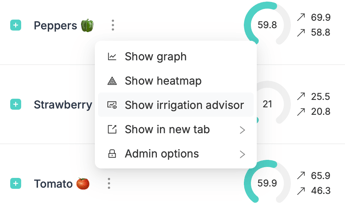
- You can open the Irrigation advisor per location, compartment, irrigation valve or placement
- Predictions will be done specifically for the level you select
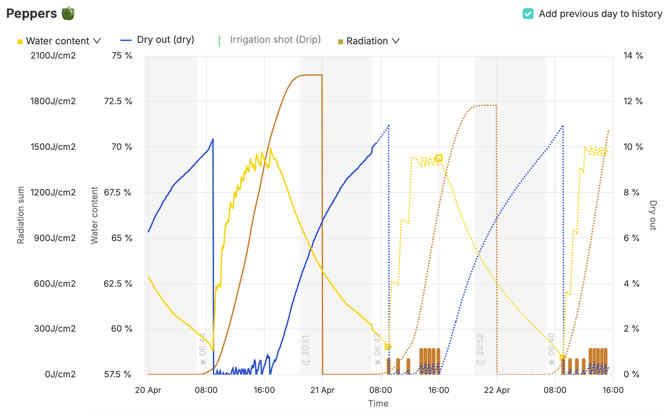
- After opening the Irrigation advisor you will see the first predictions of your dry out, water content and expected radiation
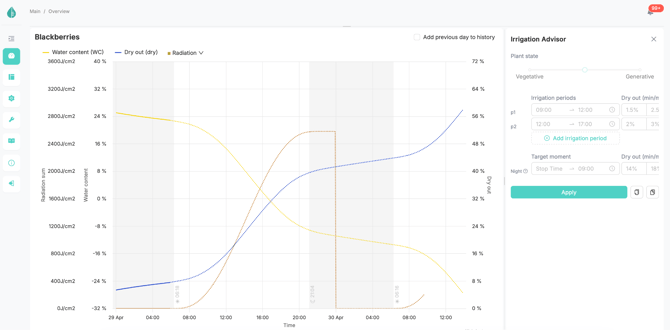
- Here you will see the water content predictions for the next 32 hours in case you would not irrigate
- The thick line shows the historical data and
- The dotted line shows the predictions
TIP: Especially in stages / cultivations that don't need irrigation every day, you can use this as a clear indicator on determining if you need to irrigate today or can wait till the next day.
- On the right side of the screen you can fill in your current / desired irrigation setpoints.
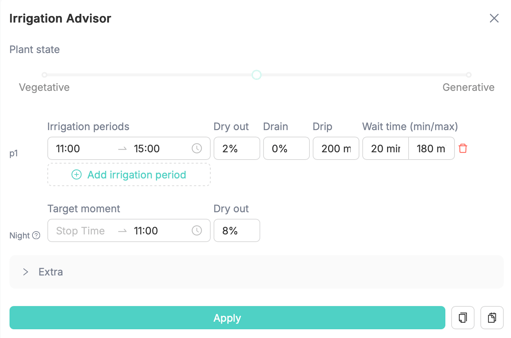
- The irrigation setpoints tell the model when you would like to irrigate
- By inputting these settings, the model will update its calculations and you will be able to see the effect of these irrigations right away
- Clicking and dragging the middle divider bar will make your setpoints screen bigger and smaller
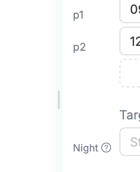
- You can also scroll from left to right in the setpoint area for easier data entry
- With the 'Plant state' slider, you can quickly select the type of irrigation strategy you want to have and see the effects of

- When the slider is to the Vegetative side, the system will choose to irrigate with smaller and more frequent shot (based on the range defined in the Extra options)
- When the slider is to the Generative side, the system will choose to irrigate with bigger and more spaced irrigation shots (based on the range defined in the Extra options)

- You can add new irrigation periods with the 'Add irrigation period' and remove them with the 'Trashcan' item behind the period
- Per period, you will have the following options to define your irrigation strategy:
- Irrigation periods: The time range for the period
- Dry out: The Dry out you would like to have per each irrigation shot — the system will determine the frequency of shots based on this value
- Drain: Select how much drain you would like to have for that period — the system will determine saturation based on this setting.
- Drip: Select the amount of irrigation water you would like to give per dripper per irrigation shot — the system will determine the size of your shots based on this value
- Wait time (min/max): The minimum and maximum waiting time you would like to have between each irrigation shot
- The system will predict your irrigation shot size and frequency based on these setpoints
TIP: Click on the 'Add previous day to history' button to show the data from the previous day in your graph. This will allow you to quickly see previous dry out values to help you set up your setpoints more accurately.
- You can setup your desired stop time in the 'Target moment'

- Fill in the time of which you want to start irrigation the next day
- Fill in the Dry out that you would like to have during the night
- With the Plant state slider, you steer your settings more vegetative or generative. Based on this the model will make you shots smaller and more frequent, or bigger and less frequent.
- In the Extra field, you can setup how much the model can deviate from your standard input.
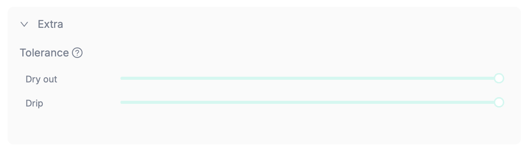
- The slider is set to 50% by default. This means that the model can make your shot sizes or shot frequency 50% bigger or smaller depending on the Plant state slider.
- Finally click on the 'Apply' button to let the model calculate and predict your new settings
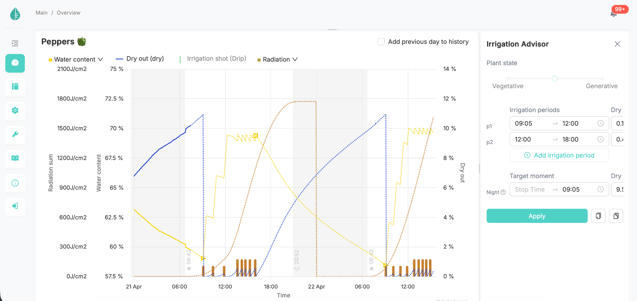
TIP: The system will predict the shot frequency on your 'Dry out', the shot size based on your 'Shot size' and your stop time based on your 'Target moment: Dry out' setpoints. You can finetune these settings to make sure you have an optimal / desired situation.
- Finally you can copy (and share) your setpoints with the 'Copy' and 'Paste' buttons next to 'Apply'
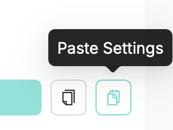
- Your settings will be stored in your clipboard and can be shared by e-mail, notes, or internal messaging services
- On the top of the graph, you will see a legend allowing you to turn on/off the lines that are most important to you

- Here you will have access to information about:
-
-
Water content: Water content percentage, Start Time, Stop Time
-
Dry out
-
Irrigation shot
- Radiation: Radiation (W/m2), Radiation Sum (J/cm2), Radiation Sum per irrigation shot (J/cm2)
-
TIP: The “Radiation Sum per irrigation shot” corresponds with the radiation you fill in the climate computer. This lets you quickly copy your settings from the Irrigation advisor to your climate computer.